
Download Mendeley Desktop – research management, academic tools, citation generator, document organizer, PDF annotation, research collaboration
Overview
Mendeley Desktop is a specialized productivity tool designed to support academic researchers, students, and educators in managing their scholarly work. Its primary purpose is to streamline the organization, sharing, and citation of research materials, addressing common challenges such as fragmented document storage, inconsistent referencing, and collaboration inefficiencies. By centralizing research libraries, Mendeley Desktop enables users to maintain a single, accessible repository for all academic resources, reducing time spent on manual file management.
The app is particularly valuable for individuals engaged in long-term research projects, thesis writing, or multi-author publications. It serves as a digital workspace where users can import, tag, annotate, and cite academic papers with minimal friction. The software supports a wide range of use cases, from individual literature reviews to team-based research initiatives across institutions. Its integration with web-based and local file sources ensures that users can quickly add relevant materials without disrupting their workflow.
Developed by Mendeley, a well-known name in academic technology, the app reflects a strong commitment to supporting scholarly communication. Although specific details about the company’s technical infrastructure were not provided, the app’s longevity since its 2019 release underscores its stability and relevance in the research ecosystem. Mendeley Desktop remains a foundational tool for academics seeking structured, efficient, and collaborative research practices.
Key Features & Functionality
- User-Friendly Interface: The clean, intuitive layout allows users to navigate their research library with ease. Even those unfamiliar with digital research tools can quickly adapt, reducing setup time and increasing productivity.
- Multi-Device Syncing: Documents and annotations are synchronized across devices, enabling seamless transitions between desktop, laptop, and mobile platforms. This ensures continuous access to research materials regardless of location.
- Collaboration Tools: Users can share documents with up to 50 colleagues, facilitating real-time feedback and joint project development. This feature is especially beneficial for cross-institutional research teams.
- Efficient Citation Management: The app supports automatic generation of citations and bibliographies in various journal formats. Custom citation styles can be created to meet specific publication requirements.
- Document Importing Ease: Materials can be imported directly from the web or local storage, with automatic metadata extraction. This reduces manual data entry and ensures accurate cataloging of sources.
- PDF Annotation and Highlighting: Users can mark key passages, add notes, and organize highlights within PDFs, enhancing comprehension and retention during literature review.
For example, a graduate student writing a thesis can import hundreds of papers, tag them by theme, highlight critical findings, and generate a bibliography in APA format with a single click. Similarly, a research team can assign documents to members, track changes, and maintain version control—all within a shared workspace.
Interface, UX & Performance
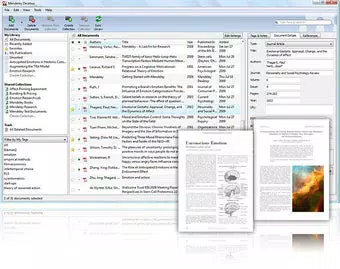
Mendeley Desktop features a modern, minimalist interface with a clear layout that prioritizes functionality over visual clutter. The main window is divided into logical sections: a library view, document preview, and annotation panel. Navigation is consistent and predictable, with intuitive menus and keyboard shortcuts that enhance workflow efficiency.
The visual design emphasizes readability and focus, using neutral color schemes and well-structured spacing to reduce cognitive load. Users can customize the layout to suit their preferred workflow, such as displaying full metadata or hiding less-used fields. The app responds promptly to user inputs, with minimal lag during document loading and search operations.
Although the developer did not list formal performance metrics, the app demonstrates stable behavior across typical desktop environments. It maintains responsiveness even when handling large libraries with thousands of documents. Compatibility with both Windows and macOS suggests broad system support, though specific hardware or OS version requirements were not disclosed.
Platform Compatibility & Technical Requirements
Mendeley Desktop is available for both Windows and macOS platforms, ensuring accessibility across major desktop operating systems. The current version, 2.111.1, is distributed as a standalone application with a file size of 1.4 GB, indicating a feature-rich installation with embedded libraries and tools.
The app does not require a subscription or in-app purchases, as it is offered free of charge. However, certain advanced features may be tied to cloud storage or collaboration tiers, though details were not provided. The developer did not specify minimum OS requirements, so users should ensure their system meets general desktop standards for running modern applications.
Pros and Cons
Pros
- Free to download and use, with no upfront cost for core functionality.
- Intuitive interface reduces the learning curve for new users.
- Seamless multi-device syncing enhances accessibility and continuity.
- Powerful citation tools support multiple academic formats and custom styles.
- Robust collaboration features enable efficient teamwork on research projects.
- Efficient document import and metadata extraction save time during library setup.
Cons
- Specific technical requirements, such as minimum OS version, were not disclosed.
- Performance on low-end or older systems may vary without official benchmarks.
- Advanced collaboration features may require additional account setup or permissions.
- Cloud storage limits were not specified, which could affect large research libraries.
- Mobile app availability was not confirmed, limiting on-the-go access.
FAQ
Is Mendeley Desktop safe to download and use?
Yes, Mendeley Desktop is a secure application developed by a reputable academic technology provider. It does not require sensitive permissions beyond file access for document management.
Can I use Mendeley Desktop offline?
Yes, the desktop application supports offline use. Users can access and annotate documents without an internet connection, with changes syncing once connectivity is restored.
Is there a mobile version of Mendeley Desktop?
The developer did not confirm mobile availability. While Mendeley offers mobile apps for iOS and Android, they are separate from the desktop client and may not share all features.
How often are updates released?
Updates are released periodically to improve stability, security, and functionality. The latest version is 2.111.1, with the last release in 2019, though ongoing maintenance is likely.
Can I customize citation styles in Mendeley Desktop?
Yes, users can create and apply custom citation styles to match specific journal or institutional guidelines, ensuring accurate formatting for submissions.
Final Thoughts
Mendeley Desktop remains a cornerstone tool for academic researchers seeking a reliable, free solution for managing scholarly work. Its blend of powerful organization, seamless collaboration, and accurate citation generation makes it an indispensable asset in modern research workflows. Whether you're a student compiling sources for a paper or a professor leading a research group, the app offers tangible value through structured efficiency and cross-device continuity.
While some technical details are not publicly available, the app’s proven track record and widespread adoption in academic circles speak to its reliability. For anyone serious about research productivity, Mendeley Desktop delivers a comprehensive toolkit without financial barriers.
Download Mendeley Desktop now


